







Cool Use for BackPack #722: To Hide the Hand-Held Scanners at your Apple Store

You’ve gotta love this, the latest post in our series of “Cool Ways People Use BackPack” with their iMac. First, the location seems familiar…because it’s an Apple Store. The accents sound sexy…because it’s in London, and well, those Londoners just do. But where are the hand-held scanners kept in this ultra-tidy Apple Europe Store?

On BackPacks. And we wouldn’t have it any other way. We’re happy to be of service.

Get your own BackPack here, whether you own a hand-held scanner or not. (Surely you’ve got something to hide. Doesn’t everyone?)

Share

My Life Scoop Loves BackPack

We make time to read Design*Sponge every chance we get — their tales of small space renovations for city dwellers and old furniture getting new life are awe-inspiring. We are suckers for great before-and-after shots. (And we should do a shout-out to the wonderful D*S founder Grace Bonney here…her new book, Design*Sponge at Home, is available for pre-order on Amazon.com right now, and you can bet we’ve ordered ours.)

Kate Pruitt, a Design*Sponge Senior Editor whose personal specialty is DIY, is one of our favorites on that site, and on another site, My Life Scoop, where she’s not afraid to show her love of all things tech.

In her words:

“As someone working in the design industry, I can tell you that getting your technology in order is crucial to your success in any creative field. The majority of graphic designers are already on board — take the fabulous typographer Jessica Hische and her streamlined office above, for example. But fine artists, craftsmen and other hands-on, low-tech worshippers should take note–the tech devices available for creatives today are really amazing, and can genuinely help creatives of all kinds spark ideas, manage their workflow, and stay organized and efficient.”

“I’ve rounded up some great gadgets and accessories that everyone in the creative class should check out. Whether it’s scanning and sharing your work online, sketching and jotting ideas on the go, or just minimizing the clutter in your office or studio, these tools can streamline your daily tasks and help open your mind to new ideas and inspirations.”

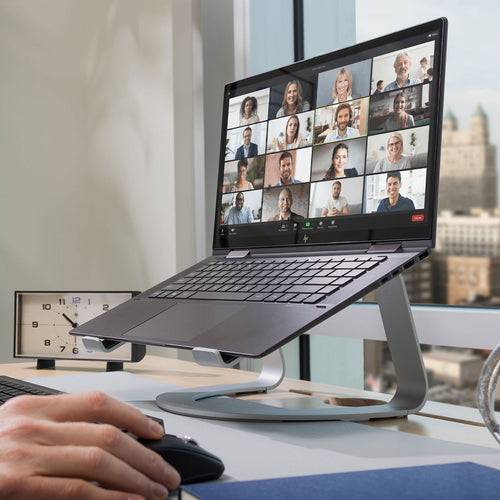
Thanks for taking notice of our BackPack (shown at #2)…it’s the best way we know of to hide things behind your Apple Cinema Display!

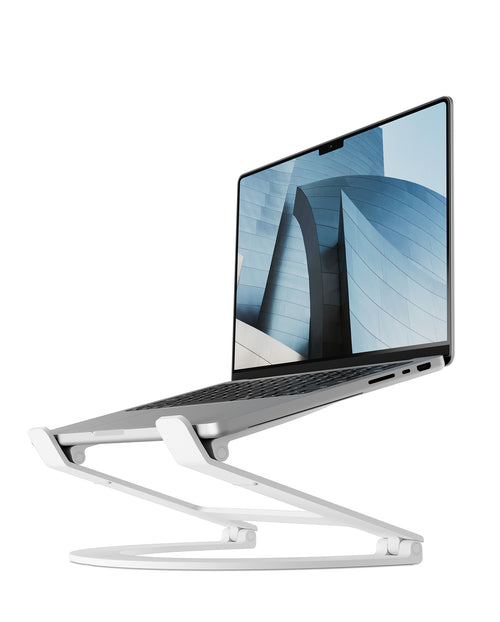
(TIP: If anyone finds #4, at $399, to be a bit steep for a laptop stand, may we suggest a certain “Apple-centric” stand we like to call BookArc for MacBook Pro, MacBook Air, or iPad?)

Share

iLounge Releases iPad 2 Buyer’s Guide: Download Yours Now!

Earlier this month, iLounge released its comprehensive iPad 2 Buyers’ Guide… with an iDesign feature on our own Andrew Green, co-founder and Creative Director of Twelve South.
The Twelve South feature is on pages 84-87 (we did say it was comprehensive!).
Download your copy today here, and you’ll be in the know — before you know it — on all things iPad 2.


Share

MASHABLE: BackPack a “Creative Office Storage Solution”

Here at Twelve South HQ, we are downright avid followers of Mashable. So it’s quite a kick when they choose one of our products in a feature article. In their roundup of “Creative Office Storage Solutions,” they mention our BackPack alongside some other cleverly designed and useful items that make offices more clutter-free, including the Mummy Mike rubber-band holder (love it), and a Giant Paperclip Wall Hook.

Here’s some great photography showing off how well BackPack works:

And here’s Mummy Mike the Rubber Band Holder because we simply can’t resist.

Get your BackPack here and make your office storage clutter-free, too. Ships free for a limited time in the US.

Share

BackPack hack makes a hot “front facing” shelf for iMac / Cinema Display

A loyal and creative Twelve South customer with a MacBook Air docked in a BookArc asked if a BackPack installed backwards on a Cinema Display could be the perfect perch for his Air’s optional SuperDrive. We’d never tried to attach a BackPack backwards so naturally we had to try it for ourselves. We were blown away how cool it was and how well it worked. See the awesome picts of our own BackPack hack below.


So how you do it?

It’s simple. Follow the enclosed instructions as if you were installing your BackPack as normal.  Insert the proper fit clips into both metal clips. Then instead of attaching the shelf on back, flip your BackPack (with short, outer metal lip facing down) and attach to the front of your iMac or Cinema Display desktop stand. Tighten both clips to secure, and you have the perfect shelf for a SuperDrive or anything else that you want to keep hidden, yet easily accessible.

Whether right-side up or upside down, BackPack is the perfect little shelf to keep all your hard drives, optical drives and other gear out of sight. Now with the newly discovered option to create a FRONT facing shelf, it’s a great time to pick up one (or two) for your iMac or Cinema Display here.

Share

iLounge + Mac on BackPack: Hey, It Rhymes! (And Works Wonders for your Desk.)

May we just say how much we love iLounge’s new iLounge + Mac endeavor? Now they’ve gone and done a gorgeous feature on our BackPack for iMac. (Which, you know, might come in super handy for that new iMac you’re Jonesing for. Just saying.)

In their words:

Since Apple has tried to eliminate cord clutter from its desktops—going so far as to ship all new iMacs with wireless keyboards and mice—it seems a shame to clutter up their looks with hard drives and other peripherals. Which is why they make the Twelve South BackPack Shelf ($30).

Offering compatibility with all iMacs and Apple Cinema Displays with desktop stands, these slick add-ons attach to your desktop companions using two clips and gravity, and thanks to their height adjustable nature, you can even use two if you’ve got a bundle of stuff to hide. As an added bonus, they’re ventilated, helping to keep those external drives cool and safe.

Like the idea of a may-as-well-be-endorsed-by-Apple clutter-free desk? Get your BackPack on here for a mere $29.99, with free shipping for a limited time (US only).

Share

iCreate on BackPack: “A strong and stylish way to clear the clutter”

We’re big fans the creative group of folks over at iCreate Magazine, and apparently they’re fans of the products we create for the machines they use everyday. Among their favorites is BackPack, the adjustable steel stand made especially for iMac and Apple Cinema Display.

So what did they think of our creation?

“Every now and then a product comes along that makes so much sense that you have to sit back and wonder why it took so long for someone to come up with. Twelve South’s BackPack shelf for Mac is one of those products.

If you’re looking for a strong and stylish way to clear the clutter of your desk, Twelve South’s BackPack might be just what you’re looking for.”

We’re pretty sure that March is “Get Organized Month” somewhere on Earth, so why not take advantage of this special time by getting your own BackPack here?

Share

Techolo.com BackPack Review: “Show off your good taste!”

Techolo.com is a blog from the Philippines that started as a way for its founder, Roman, to talk about Zune related things. Since then, he’s expanded into all things technology, from trends to other news and reviews.

We love Techolo’s detailed photography of BackPack — it’s a great way for people to see precisely how BackPack works.  And at the moment, we envy Roman his tidy desk!

Techolo’s conclusion about BackPack for iMac:

“For its SRP of  $30 be sure that your iMac is not facing the wall (like mine) so you get to show off your good taste!”

Read the whole thing and check out their great photos here. Thanks for the review!

Share

Mac Life craves BackPack as “a useful and simple idea” for iMac or ACD

maclife_pr

Suzie from Mac Life chose our BackPack for iMac as her choice of gear to lust after for November, and who could argue? BackPack is the easiest way to keep your desk clear from hard drives and anything else you want to hide, and puts the focus back on the iMac.

BackPack is easy to install, height adjustable and fits the newest iMacs released in July 2010 and the Apple Cinema Display.

Are you lusting after the BackPack too? Click here to get one for your iMac.

Share

Bonus points for new BackPack review – they figured out the ‘cable management’

Screen shot 2010-04-05 at 12.38.48 PM

From day one we’ve included cable management with the BackPack. It consists of 22 inches of coated cable tie to be cut to your desired length. It then can be threaded through the holes in the BackPack to neatly secure the extra cables underneath. Only thing is, this little extra feature usually flies right over everyone’s head. That’s why we like this review so much – they ‘noticed’ the cable management feature! Yay. See it at minute 2:40.

Watch the full review here: http://www.youtube.com/watch?v=yI_t0tkRs4g

To get your own BackPack – WITH cable management - visit here.

Share